
For most local businesses in Michigan, the Google Business Profile is the first thing a customer sees, before your website, before your reviews on other sites, and often before they ever call. This Google Business Profile Michigan checklist covers every setting that matters in 2026, including what changed when Google removed the Q&A section. It is one part of our full Michigan SEO tactics playbook.
Quick answer
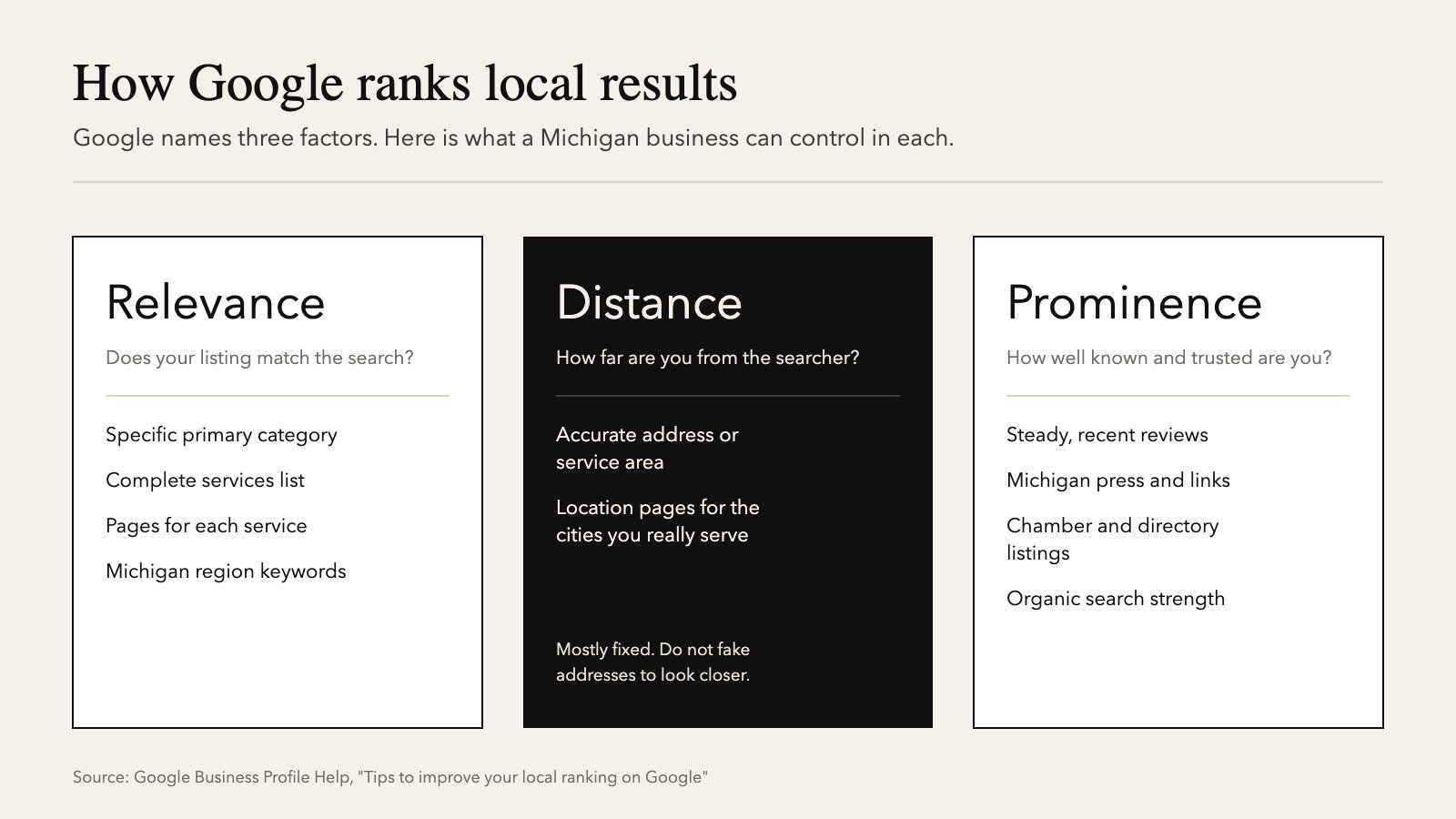
Use your real business name, the most specific category, an honest service area, complete hours and services, monthly photos and updates, and a steady flow of genuine reviews. Google ranks local results on relevance, distance, and prominence [1], and a complete profile improves the two you control.
The 10-step Google Business Profile Michigan checklist
1. Use your real business name
Your profile name must match the name on your storefront, signage, and paperwork. Adding extras like “Grand Rapids Roofing Experts” when that is not your name breaks Google’s guidelines and is a common reason profiles get suspended [2].
2. Choose the most specific primary category
The primary category is one of the strongest relevance signals you control. “Emergency veterinarian” is better than “Veterinarian” if that is what you do. Add secondary categories only when they describe real services.
3. Set your address or service area honestly
If customers visit you, show your address. If you travel to customers, like plumbers or snow removal companies, hide your address and set a service area. Google’s guidelines say service areas should not extend farther than about two hours of driving from your base [2]. For a Lansing business, that means listing the real counties you serve, such as Ingham, Eaton, and Clinton, not the whole state.
4. Keep hours complete, including Michigan holidays and seasons
Set special hours for Thanksgiving, Christmas Eve, New Year’s, Memorial Day, and the Fourth of July. Seasonal businesses, like Up North marinas, ice cream shops, or cider mills, should update hours when they open and close for the season so Google does not show them as open when they are not.
5. List every service and product
Services help Google match you to specific searches. A Dearborn auto shop should list brake repair, oil change, and diagnostics separately, using the words customers search for.
6. Write a description that names your Michigan region
You get up to 750 characters. Put the most important information first: what you do, who you serve, and where. Mention your region naturally, like “serving Metro Detroit and Downriver.” Do not include links, prices, or promotions, which the guidelines do not allow in the description.
7. Add real photos every month
Upload your storefront (in both summer and snow, so people recognize it year-round), your team, your vehicles, and finished work. Real photos build trust. Stock photos do not.
8. Post updates
Posts show offers, events, and news right on your profile. Tie them to the Michigan calendar: furnace tune-ups in September, cottage opening services in April, and holiday hours in November. Our Michigan seasonal SEO calendar shows what to post when.
9. Build a steady flow of genuine reviews
Ask every customer, soon after the job, with your direct review link. Reply to every review. Never offer discounts for reviews, never filter out unhappy customers before asking, and never post reviews written by staff or AI. Google prohibits incentivized and fake reviews [4], and the FTC’s rule allows civil penalties for fake reviews [5].
10. Prepare for Google’s AI “Ask” feature
Google phased out the public Questions and Answers section in late 2025 and replaced it with an AI feature that answers customer questions using your profile, reviews, and website [3]. You can no longer seed answers yourself, so the AI is only as accurate as your information. Keep the profile complete and publish a clear FAQ on your website covering prices, service areas, hours, and policies.
Common Google Business Profile Michigan mistakes
| Mistake | Fix |
|---|---|
| City names stuffed into the business name | Use your real name and put locations in the description and services |
| Service area set to “Michigan” | List the counties and cities you really serve |
| Summer hours still showing in January | Update seasonal and holiday hours on a calendar |
| Only stock photos | Upload real photos monthly |
| Old phone number on directories | Match name, address, and phone everywhere |
| Unanswered negative reviews | Reply calmly within a few days and offer to resolve it offline |
How to measure results
Open the performance report in your Business Profile each month and track calls, website clicks, and direction requests. Compare month to month and year over year, since Michigan demand is seasonal. Pair it with Google Search Console to see which searches bring people to your website [6]. For help reading the numbers with AI, see Let AI read your data.
Frequently asked questions
Is a Google Business Profile free?
Yes. Creating and managing a profile is free, and Google states you cannot pay to rank higher in local results [1].
Can I have a profile if I work from home in Michigan?
Yes, if you serve customers in person. Hide your home address and set a service area instead [2]. Online-only businesses are not eligible.
How often should I post on my Business Profile?
Aim for at least a few times a month, and more around your busy season. Consistent, useful posts matter more than volume.
Where did the Q&A section go?
Google replaced it with an AI “Ask” feature in late 2025 [3]. Keep your profile and website FAQ accurate, because that is what the AI uses to answer.
Keep learning
- Michigan SEO tactics: the full local search playbook
- AI techniques for Michigan marketers: prompts, translation, and compliance
- The Michigan seasonal SEO calendar: what to publish and when
Sources
- Tips to improve your local ranking on Google. Google Business Profile Help.
- Guidelines for representing your business on Google. Google Business Profile Help.
- Google Business Profile Q&A. BrightLocal, updated 2026.
- Prohibited and restricted content: fake engagement. Google Maps user contributed content policy.
- FTC announces final rule banning fake reviews and testimonials. Federal Trade Commission, August 2024.
- Google Search Console. Google.